บทเรียนต่อยอด RecyclerView บน Android ด้วย Kotlin กับการทำ itemClickListener บน Viewholder ให้เปลี่ยนหน้า Intent และส่งค่า
จากบทเรียนเดิม เขียนแอพฯ Android ด้วย Kotlin การใช้ RecyclerView และ Array
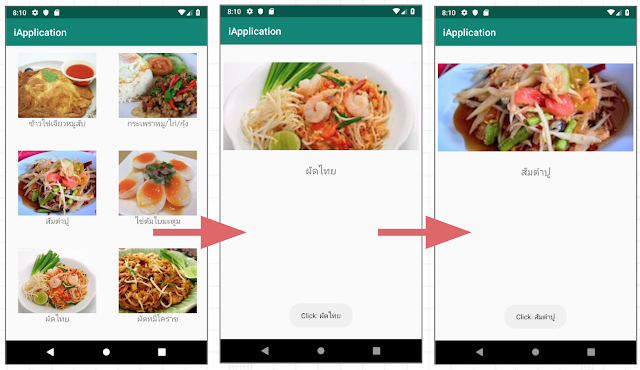
เราจะมาทำให้แอพพลิเคชันก่อนหน้าของเราที่เป็นเมนูอาหารนั้น แตะรายการแล้วเปลี่ยนหน้าได้:

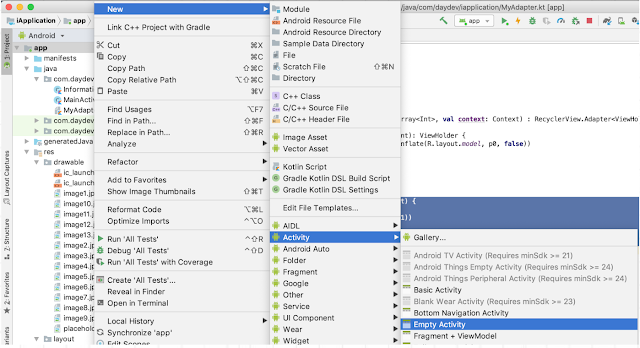
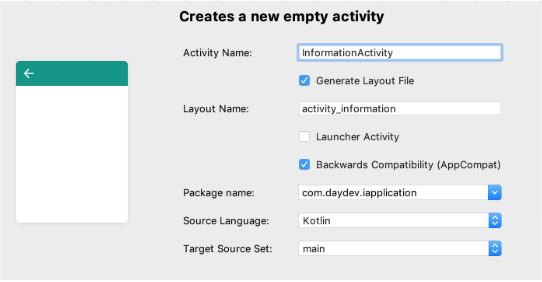
สร้างหน้า Empty Activity ใหม่ขึ้นมาโดยคลิกขวาที่ apps->New->Activity->Empty Activity แล้วตั้งชื่อว่า InformationActivity
แก้ไข Layout ส่วนของ XML ไฟล์ activity_information.xml ดังนี้:
<?xml version="1.0" encoding="utf-8"?>
 <android.support.constraint.ConstraintLayout
     xmlns:android="http://schemas.android.com/apk/res/android"
     xmlns:tools="http://schemas.android.com/tools"
     xmlns:app="http://schemas.android.com/apk/res-auto"
     android:layout_width="match_parent"
     android:layout_height="match_parent"
     tools:context=".InformationActivity">
   <ImageView
       android:layout_width="400dp"
       android:layout_height="180dp"
       android:id="@+id/imageView" app:layout_constraintEnd_toEndOf="parent"
       android:layout_marginEnd="8dp" app:layout_constraintStart_toStartOf="parent"
       android:layout_marginStart="8dp" android:layout_marginTop="36dp" app:layout_constraintTop_toTopOf="parent"
       app:layout_constraintHorizontal_bias="0.498" android:scaleType="centerCrop"
       app:srcCompat="@drawable/image1"/>
   <TextView
       android:text="TextView"
       android:layout_width="0dp"
       android:layout_height="wrap_content"
       android:id="@+id/textView" android:layout_marginTop="28dp"
       app:layout_constraintTop_toBottomOf="@+id/imageView" app:layout_constraintStart_toStartOf="parent"
       android:layout_marginStart="8dp" app:layout_constraintEnd_toEndOf="parent" android:layout_marginEnd="8dp"
       android:textAlignment="center" android:textSize="20dp"/>
 </android.support.constraint.ConstraintLayout>
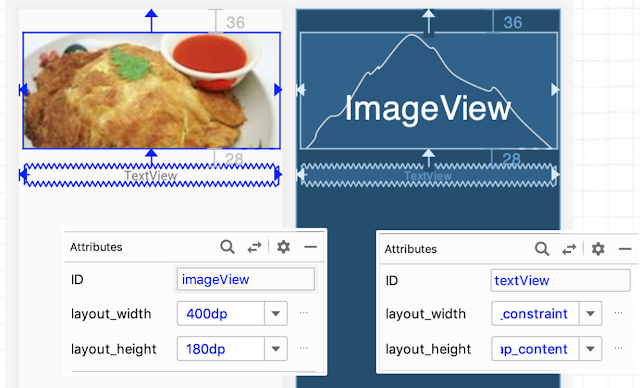
ซึ่ง Layout นี้จะมี TextView กับ ID ชื่อ textview และ ImageView ที่มี ID ชื่อ imageView
กลับไปที่ไฟล์ MyAdapter.kt กลับไปแก้ไขฟังก์ชัน onBindViewHolder() เราจะแทรกคำสั่ง setOnClicklistener() เข้าไปและเรียกใช้ Intent โดยอ้าง Context หน้านั้นๆ ได้โดยตรงพร้อมระบุ array position ไปยังหน้าปลายทางได้
override fun onBindViewHolder(p0: ViewHolder, p1: Int) {
   p0?.getNameTxt?.text = items.get(p1)
   p0?.getThumbnail?.setImageResource(imageId.get(p1))
   p0?.itemView.setOnClickListener {
     Toast.makeText(context, "Click: "+items.get(p1), Toast.LENGTH_LONG).show()
     var intent = Intent(context, InformationActivity::class.java)
     intent.putExtra("TITLE",""+ items.get(p1))
     intent.putExtra("IMAGE",imageId.get(p1))
     context.startActivity(intent)
   }
 }
สังเกตจะเห็นว่า IMAGE เป็น parameter ที่ส่งค่า Int ไม่ใช้ String
กลับไปที่หน้า InformationActivity.kt แก้ไข Class ของมันให้เป็นแบบนี้:
package com.daydev.iapplication
 import android.content.Intent
 import android.content.Intent.getIntent
 import android.support.v7.app.AppCompatActivity
 import android.os.Bundle
 import android.widget.ImageView
 import android.widget.TextView
 class InformationActivity : AppCompatActivity() {
   var textView: TextView? = null
   var imageView: ImageView? = null
   override fun onCreate(savedInstanceState: Bundle?) {
     super.onCreate(savedInstanceState)
     setContentView(R.layout.activity_information)
     textView = findViewById(R.id.textView) as TextView
     imageView = findViewById(R.id.imageView) as ImageView
     var intent = getIntent()
     textView!!.setText(""+intent.getStringExtra("TITLE"))
     imageView!!.setImageResource(intent.getIntExtra("IMAGE",0))
   }
 }
ทดสอบแตะที่รายการอาหารดู เพื่อสังเกตข้อมูลการเปลี่ยนหน้า: