บทเรียนการสร้างเว็บ CMS ดึงข้อมูลรายการจาก Firebase Realtime Database ด้วย Python กับ Django framework
บทเรียนก่อนหน้า:
- การพัฒนา Web Application บน Python ด้วย Django Framework
- สร้าง Web Application ด้วย Python Django เข้าระบบด้วยการทำ Firebase Authentication
- สร้าง Web Application ด้วย Python Django ทำระบบ Sign Up สมัครสมาชิกด้วย Firebase
- สร้าง Web ด้วย Python Django การจัดการข้อมูล Firebase Realtime Database
ขั้นแรกให้ไปแก้ไขส่วนของ Path สำหรับแสดงผลรูปภาพผ่านเว็บไซต์ก่อนไปที่ urls.py แก้ไข Header เพิ่ม:
#media path
from django.conf import settings
from django.conf.urls.static import static
และเพิ่มคำสั่งต่อไปนี้ปิดท้ายของ urlpatterns =[]
+ static(settings.MEDIA_URL, document_root=settings.MEDIA_ROOT)
เราจะเพิ่ม Routing ของ main เข้าไปให้กับเว็บไซต์ของเรา
# main
url(r'^main/', views.main)
ดังนั้นไฟล์ urls.py จะเป็นดังนี้:
from django.conf.urls import url
from django.contrib import admin
from . import views
#media path
from django.conf import settings
from django.conf.urls.static import static
urlpatterns = [
    url(r'^admin/', admin.site.urls),
    url(r'^$', views.home),
    url(r'^signin/', views.signin),
    url(r'^result/', views.result),
    url(r'^register/', views.register),
    url(r'^signup/', views.signup, name='signup'),
    # upload
    url(r'^add/', views.add),
    # main
    url(r'^main/', views.main)
] + static(settings.MEDIA_URL, document_root=settings.MEDIA_ROOT)
ทำการเขียนฟังก์ชันของ main ในไฟล์ views.py
def main(request):

    data = []
    all_users = database.child("artist").child("data").get()
    for content in all_users.each():
        message = content.val()
        data.append(message)
    return render(request, "main.html", {"data": data})
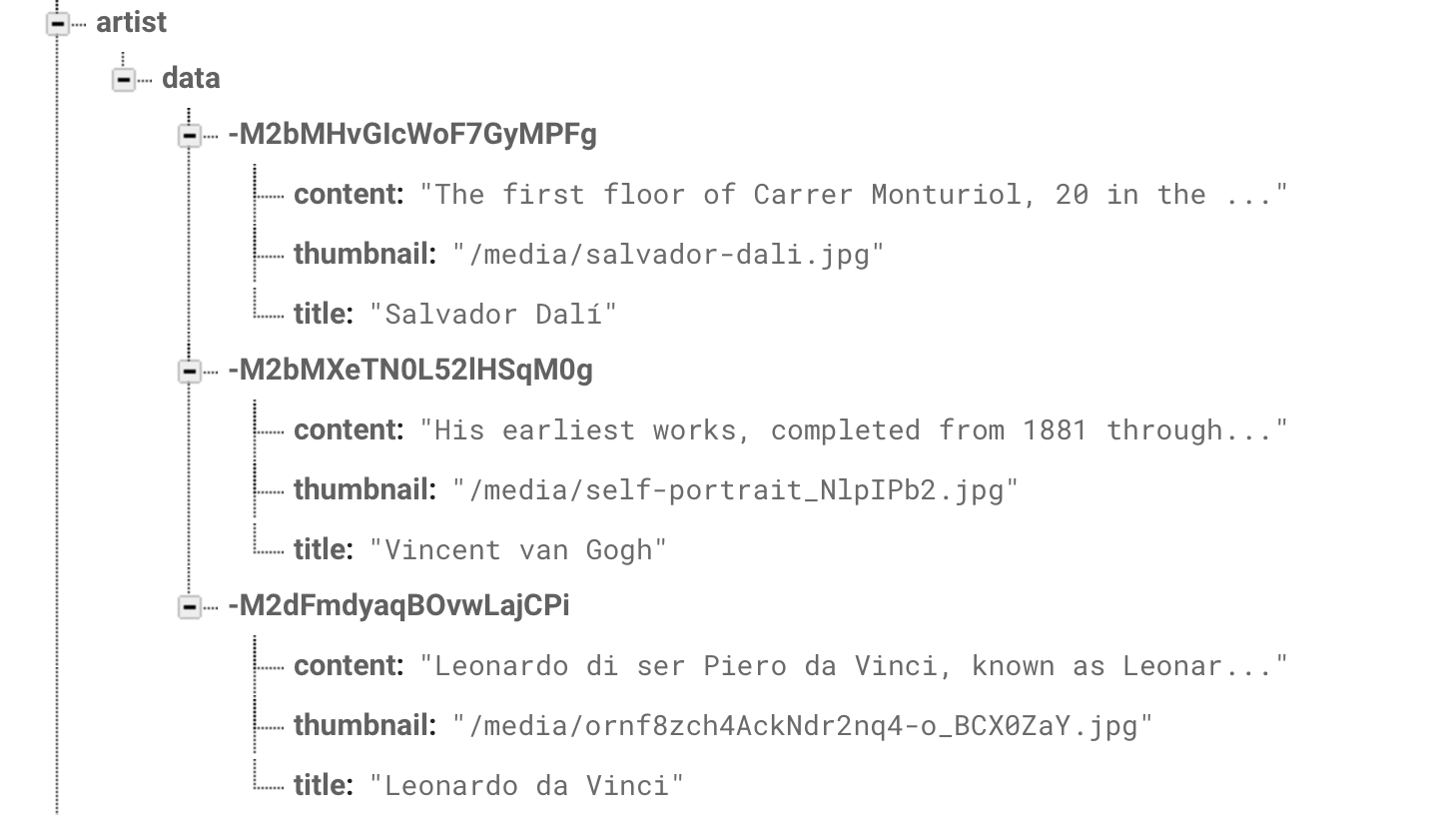
เป็นการไปเรียกชุดของ Firebase ใน artist->data มาเก็บลงใน all_users หลังจากนั้นให้เรา ForEach ตัว content ไปวนค่า all_users มาเก็บค่า content.val() ประเด็นคือเทคนิคที่ผมทำผมไปสร้าง array มาตัวหนึ่งชื่อ data แล้วเมื่อมีการ Get ค่า Firebase Retrive Data รับค่ามาก็ทำการยัดลงใน Array ของ Data ไปเลยตรงๆ
data.append(message)
หลังจากนั้นไปเก็บเป็น Parameter ชื่อ data เช่นกันส่งไปที่ template ของ main.html ใน:
return render(request, "main.html", {"data": data})
ภาพรวมของ views.py จะเป็นดังนี้:
import pyrebase
from django.http import HttpResponse
from django.shortcuts import render,redirect
from django.contrib import auth
#Upload
from django.conf import settings
from django.core.files.storage import FileSystemStorage


config = {
    'apiKey': "<<API_KEY>>",
    'authDomain': "<<APP_ID>>.firebaseapp.com",
    'databaseURL': "https://<<APP_ID>>.firebaseio.com",
    'projectId': "<<APP_ID>>",
    'storageBucket': "<<APP_ID>>.appspot.com",
    'messagingSenderId': "<<SENDR ID>>",
    'appId': "<<YOU SUCK>>"
}
firebase = pyrebase.initialize_app(config)
auth = firebase.auth()
database=firebase.database()

storage = firebase.storage()

def home(request):
    return render(request, "index.html")


def signin(request):
    return render(request, "signin.html")


def register(request):
    return render(request, "register.html")


def result(request):
    email = request.POST.get('email')
    password = request.POST.get("pass")
    try:
        user = auth.sign_in_with_email_and_password(email, password)
    except:
        message = "invalid cerediantials"
        return render(request, "signin.html", {"msg": message})
    print(user)
    return render(request, "main.html", {"e": email})


def signup(request):
    fullname = request.POST.get('fullname')
    email = request.POST.get('email')
    password = request.POST.get('pass')
    try:
        user = auth.create_user_with_email_and_password(email, password)
        uid = user['localId']
        data = {"name": fullname, "status": "1"}
        database.child("users").child(uid).child("details").set(data)
    except:
        message = "Unable to create account try again"
        return render(request, "signup.html", {"msg": message})

    return render(request, "signin.html")

def add(request):
    if request.method == 'POST' and request.FILES['myfile']:
        title = request.POST.get('title')
        content = request.POST.get('content')
        myfile = request.FILES['myfile']
        fs = FileSystemStorage()
        filename = fs.save(myfile.name, myfile)
        uploaded_file_url = fs.url(filename)

        data = {"title": title, "content": content, "thumbnail": uploaded_file_url }
        database.child("artist").child().child("data").push(data)
        storage.child(uploaded_file_url).put(myfile)

        message = "Upload Complete!"
        return render(request, 'add.html', {
            'uploaded_file_url': uploaded_file_url,
            "msg": message
        })

    return render(request, 'add.html')

def main(request):

    data = []
    all_users = database.child("artist").child("data").get()
    for content in all_users.each():
        message = content.val()
        data.append(message)
    return render(request, "main.html", {"data": data})
จากบทเรียนก่อนหน้าให้เราเปิดไฟล์ main.html ขึ้นมาแก้ไขหน้าเดิมที่เคยทำด้วยคำสั่ง HTML แก้ไขเป็นดังนี้:
{% if msg %}
<script>
    alert('{{msg}}')
</script>
{% endif %}
<!DOCTYPE html>
<html lang="en">

<head>
    <meta charset="UTF-8">
    <link rel="apple-touch-icon" type="image/png"
        href="https://static.codepen.io/assets/favicon/apple-touch-icon-5ae1a0698dcc2402e9712f7d01ed509a57814f994c660df9f7a952f3060705ee.png" />
    <meta name="apple-mobile-web-app-title" content="CodePen">
    <link rel="shortcut icon" type="image/x-icon"
        href="https://static.codepen.io/assets/favicon/favicon-aec34940fbc1a6e787974dcd360f2c6b63348d4b1f4e06c77743096d55480f33.ico" />
    <link rel="mask-icon" type=""
        href="https://static.codepen.io/assets/favicon/logo-pin-8f3771b1072e3c38bd662872f6b673a722f4b3ca2421637d5596661b4e2132cc.svg"
        color="#111" />
    <title>Content Management System</title>
    <link rel='stylesheet' href='https://fonts.googleapis.com/icon?family=Material+Icons'>
    <link rel='stylesheet' href='https://storage.googleapis.com/code.getmdl.io/1.0.1/material.teal-red.min.css'>
    <link rel='stylesheet' href='https://fonts.googleapis.com/css?family=Roboto:300,400,500,700'>

</head>

<body translate="no">
    <div class="mdl-layout mdl-js-layout mdl-layout--fixed-header">
        <header class="mdl-layout__header">
          <div class="mdl-layout__header-row">
            <!-- Title -->
            <span class="mdl-layout-title">Firebase Python CMS</span>
            <!-- Add spacer, to align navigation to the right -->
            <div class="mdl-layout-spacer"></div>
            <!-- Navigation. We hide it in small screens. -->
            <nav class="mdl-navigation mdl-layout--large-screen-only">

                <a class="mdl-navigation__link" href="#">
                    {% csrf_token %}
                    Welcome {{e}}
                </a>
                <a class="mdl-navigation__link" href="/add">Add Data</a>
                <a class="mdl-navigation__link" href="/logout">Logout</a>
            </nav>
          </div>
        </header>
        <div class="mdl-layout__drawer">
          <span class="mdl-layout-title">Python CMS</span>
          <nav class="mdl-navigation">

            <a class="mdl-navigation__link" href="#">
                {% csrf_token %}
                Welcome {{e}}
            </a>
            <a class="mdl-navigation__link" href="/add">Add Data</a>
            <a class="mdl-navigation__link" href="/logout">Logout</a>
          </nav>
        </div>
        <main class="mdl-layout__content">
          <div class="page-content">
            <div style="padding-top: 20px; width:50%; margin:0 auto;">
              <table class="mdl-data-table mdl-js-data-table mdl-shadow--2dp" style="width:100%;">
                <thead>
                  <tr>
                    <th class="mdl-data-table__cell--non-numeric">Thumbnail</th>
                    <th>Title</th>
                    <th>Option</th>
                  </tr>
                </thead>
                <tbody>
                  {% load staticfiles %}
                  {% for record in data %}
                    <tr>
                      <td><img src="{{BASE_DIR}}{{record.thumbnail}}" style="width:60px; height:auto"></td>
                      <td class="mdl-data-table__cell--non-numeric">{{record.title}}</td>
                      <td>Detail</td>
                    </tr>
                  {% endfor %}
                </tbody>
              </table>
            </div>

          </div>
        </main>
      </div>
    <script src='https://storage.googleapis.com/code.getmdl.io/1.0.1/material.min.js'></script>
</body>

</html>
จะเห็นว่าผมทำการ Foreach ใน Template ค่า data ที่รับ Parameter มาจาก views.py ใน main.html เช่นกันคือ
{% for record in data %}
   <tr>
     <td><img src="{{BASE_DIR}}{{record.thumbnail}}" style="width:60px; height:auto"></td>
     <td class="mdl-data-table__cell--non-numeric">{{record.title}}</td>
     <td>Detail</td>
   </tr>
{% endfor %}
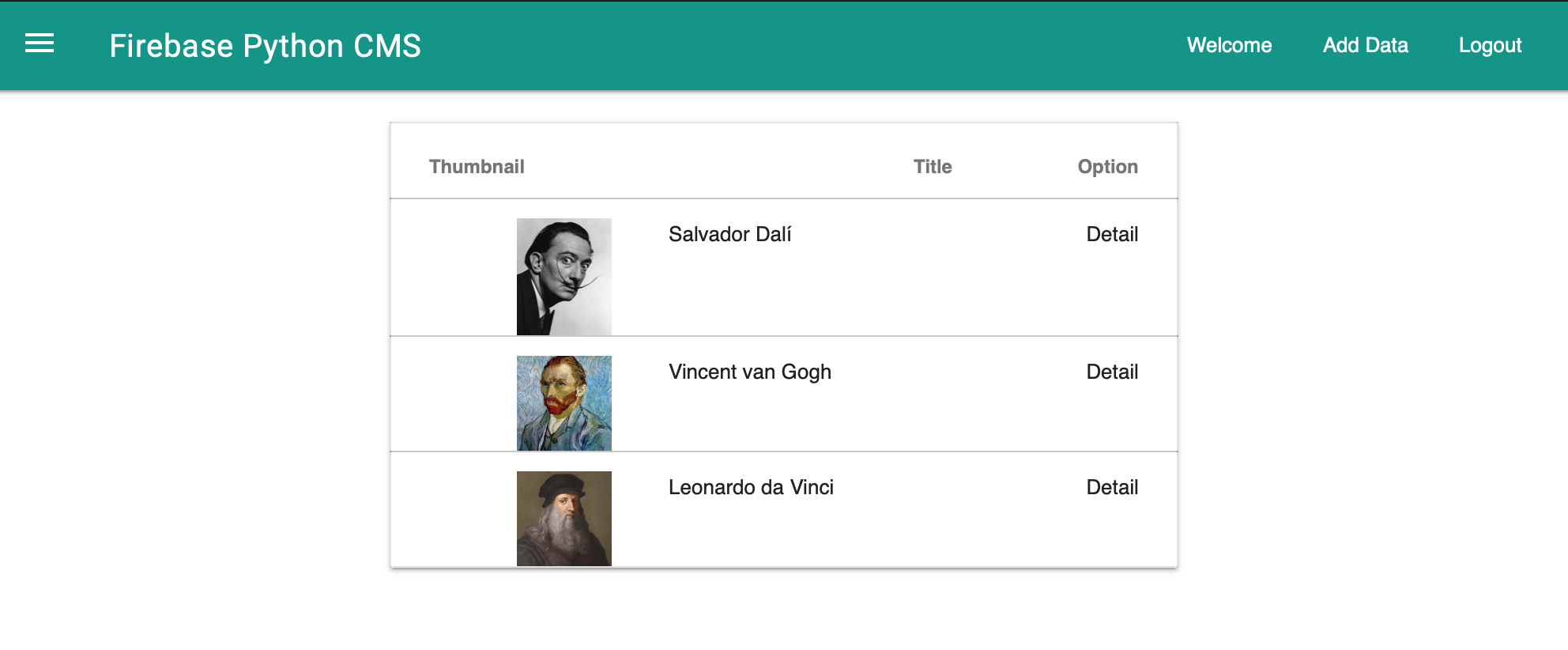
ทดสอบดูหน่อยจะเห็นว่า หน้าเว็บไซต์ของเราจะเป็นดังนี้ เป็นการแสดงรายการข้อมูลของเราแล้ว ให้ไปที่ http://localhost:8000/main/
บทเรียนต่อไปจะเป็นการ เขียนฟังก์ชันในการ View, Edit และ Delete ของระบบ CMS ที่ใช้ฐานข้อมูลบน firebase ครับ