การใช้ AngularJS สร้าง Web Application แบบ MVC โดยใช้ View และ Controller เบื้องต้นให้เรียก JSON ส่วนของ Web Service มาแสดงบน ng-repeat สำหรับผู้เริ่มต้น
บทเรียนให้ศึกษาก่อนหน้านี้ สำหรับ AngularJS
- การเขียน Single Page Application ด้วย AngularJS
- AngularJS กับการวนซ้ำข้อมูลด้วย ng-repeat และกรองด้วย Filter
- AngularJS การแยก Controller และทำงานร่วมกับ Table
บทเรียนนี้ก็เลยจะเป็นการทำงานร่วมกับ MySQL และ PHP ครับด้วย JSON Web Service โดยการ Encode และ Decode ออกมาใช้งานกับ AngularJS
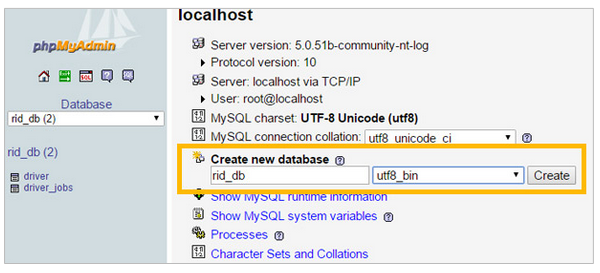
สร้าง MySQL Database ขึ้นมาครับ แล้ว Create Database ดังนี้
CREATE TABLE `driver` (
  `id` int(10) NOT NULL auto_increment,
  `first_name` varchar(255) character set utf8 default NULL,
  `last_name` varchar(255) character set utf8 default NULL,
  `tel` varchar(255) collate utf8_bin NOT NULL,
  `TruckNo` varchar(255) collate utf8_bin default NULL,
  `TruckPV` varchar(255) collate utf8_bin default NULL,
  PRIMARY KEY  (`id`)
);
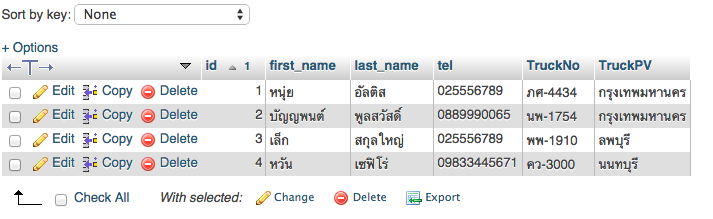
เสร็จแล้วก็ใส่ ข้อมูลลงไปเป็นตัวอย่างเล็กน้อยครับ
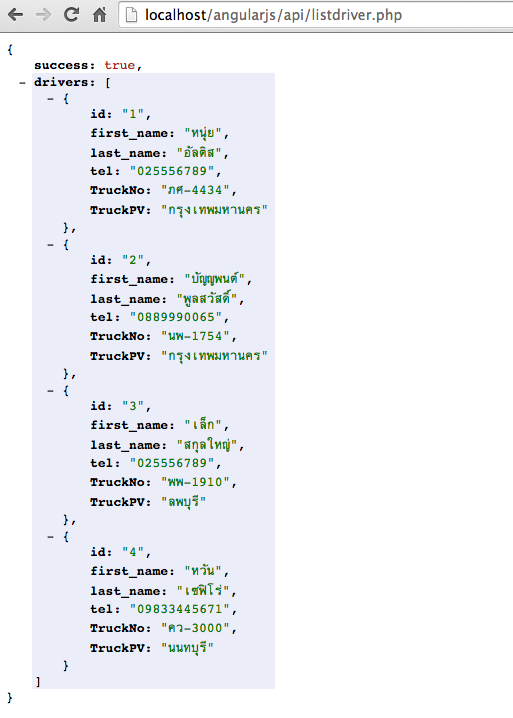
เปิด Appserv? หรือ XAMPP ขึ้นมาครับสร้าง โฟลเดอร์ว่า api ขึ้นมาแล้วเขียน PHP ใหม่ว่า listdriver.php เป็นการเรียก Method ชื่อ listdriver() นั่นเอง
<?php
include"db.php";
$strSQL = "SELECT * FROM driver";
$objQuery = mysql_query($strSQL) or die ("Error Query [".$strSQL."]");

while($objResult = mysql_fetch_array($objQuery))
	{
		$drivers[] = array(
                'id' => $objResult['id'],
                'first_name' => $objResult['first_name'],
                'last_name' => $objResult['last_name'],
                'tel' => $objResult['tel'],
				'TruckNo' => $objResult['TruckNo'],
				'TruckPV' => $objResult['TruckPV']
		);
	}
header("content-type:text/javascript;charset=utf-8");
header("Content-Type: application/json; charset=utf-8", true, 200);
	print json_encode(array("success" => true,"drivers"=>$drivers));
mysql_close($objConnect);
?>
เพื่อให้การทำงาน Cross Domain ได้เราต้องเพิ่มส่วนนี้ลงไปใน header() ครับ
header("Access-Control-Allow-Origin: *");
ภาพรวมไฟล์ listdriver.php จะเป็นแบบนี้ครับ
<?php
include"db.php";
$strSQL = "SELECT * FROM driver";
$objQuery = mysql_query($strSQL) or die ("Error Query [".$strSQL."]");

while($objResult = mysql_fetch_array($objQuery))
	{
		$drivers[] = array(
                'id' => $objResult['id'],
                'first_name' => $objResult['first_name'],
                'last_name' => $objResult['last_name'],
                'tel' => $objResult['tel'],
				'TruckNo' => $objResult['TruckNo'],
				'TruckPV' => $objResult['TruckPV']
		);
	}
header("Access-Control-Allow-Origin: *");
header("content-type:text/javascript;charset=utf-8");
header("Content-Type: application/json; charset=utf-8", true, 200);
	print json_encode(array("success" => true,"drivers"=>$drivers));
mysql_close($objConnect);
?>
ทดสอบ Web Service ของเรากันหน่อย
กลับมาสร้าง ไฟล์ index.html ครับ ให้สร้างไฟล์ตามนี้ครับ
<!doctype html>
<html ng-app="indexApp">
<head>
<meta charset="UTF-8">
<title>AngularJS</title>
<link rel="stylesheet" href="css/bootstrap.min.css">
<script src="js/angular.min.js"></script>
</head>
<body>
<div class="container" ng-controller="indexController">
<ul class="nav nav-pills" role="tablist">
        <li role="presentation" class="active"><a href="#">Home</a></li>
        <li role="presentation"><a href="register.html">Register</a></li>
        <li role="presentation"><a href="#job">Jobs Report</a></li>
</ul>
<h3>Driver List</h3>
<div class="panel panel-primary">
    <div class="panel-heading">
    <h3 class="panel-title">Search: </h3>
    </div>
	<div class="panel-body">
    	<input class="form-control" ng-model="searchText"/>

    </div>
</div>

</div>

<script src="controller/index.js"></script>
</body>
</html>
สังเกตุจะเห็นว่าเราตั้งชื่อ ng-app ว่า indexApp และตั้งชื่อ ng-controller ว่า indexController ไว้เตรียมพร้อมสำหรับ AngularJS ครับ และถ้ามองดีๆ ให้เราเตรียม Controller ของเราโดยสร้าง folder ชื่อ “controller” ก่อนแล้วสร้างไฟล์มาใหม่ว่า index.js เก็บไว้ใน controller นั้นครับ โดยมี Code ดังนี้
angular.module('indexApp', [])
.controller('indexController', function($scope, $http, $location, $window) {
    $http.get("http://localhost/AngularJS/api/listdriver.php")
    .success(function (response) {$scope.driver = response.drivers;});

});
โดยจะเป็นการเรียก Key ที่อยู่ใน JSON ทั้งหมดมาเก็บลงใน $scope ของ driver ครับ สังเกตุว่า Key ที่เรียกผ่าน response นั้นชื่อ drivers ใน JSON ครับ
เราเลยต้องมาเขียนร่วมกับ Table ทันทีครับ
<table class="table table-striped">
  <thead>
    <tr>
      <th>First Name</th>
      <th>Last Name</th>
      <th>Telephone</th>
      <th>Truck Number</th>
      <th>Truck Province</th>
      <th></th>
    </tr>
  </thead>
  <tbody>
    <tr ng-repeat="user in driver | filter:searchText">
      <td>{{user.first_name}}</td>
      <td>{{user.last_name}}</td>
      <td>{{user.tel}}</td>
      <td>{{user.TruckNo}}</td>
      <td>{{user.TruckPV}}</td>
      <td></td>
    </tr>
  </tbody>
</table>
ทดสอบครับ
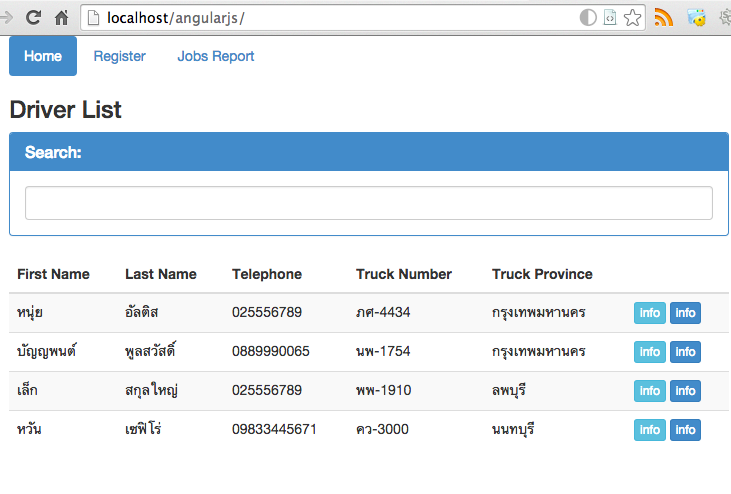
จะเห็นว่าทำงานได้เรียบร้อยแล้ว บทเรียนต่อไปจะเป็นการสร้าง Register สำหรับกรอกข้อมูลใหม่เพื่อนำเข้า Insert ใน MySQL ร่วมกับ PHP (Post Method) ครับ