วิธีการเขียนเกมบน HTML5 ด้วย Cocos2d X และ JavaScript จากตอนแรกที่เรียกตัวละคร รอบนี้เป็นการโหลดกราฟิกตัวศัตรูให้เคลื่อนไหวด้วยฟังก์ชัน Interval เวลา
วิธีเพิ่มศัตรูเข้ามาในฉาก
จากบทเรียนก่อนหน้านี้ เขียนเกมบน HTML5 ด้วย Cocos2d X HTML และ JavaScript สร้างตัวละคร
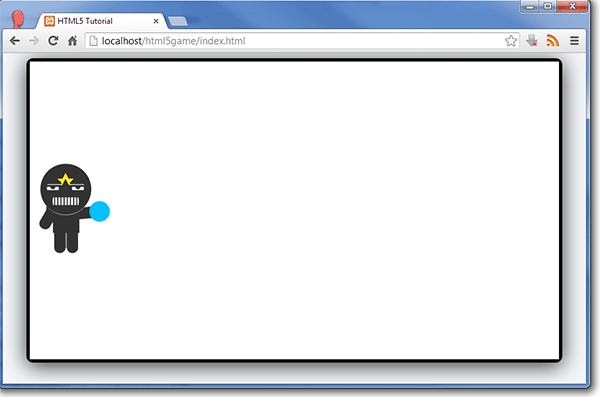
เตรียมไฟล์กราฟิกของศัตรูของเรา ตั้งชื่อว่า “gamemonster.png” ขึ้นมาครับ
เข้าไปแก้ไขไฟล์ “Src/resource.js” โดยเพิ่ม ศัตรู และ กระสุนลงไป
var s_monster = dirArt + "gamemonster.png";
และ
{type:"image", src:s_monster}
ลงไปในหมวดหมู่ของมัน Code ของไฟล์ resource.js จะเป็นดังนี้
var dirGraphics = "Graphics/";
var s_player = dirGraphics + "gameplayer.png";
var s_monster = dirGraphics + "gamemonster.png";

var g_ressources = [
{type:"image", src:s_player},
{type:"image", src:s_monster},
];
ข้อสังเกตระวังเครื่องหมาย “,”
แก้ไขไฟล์ “Src/MainLayer.js” ในส่วนบนของคำสั่งให้เป็นดังนี้
var MainLayer = cc.LayerColor.extend({

_monsters:[],

ctor:function() {
แก้ไขคำสั่ง onEnter:function() จากเดิม
onEnter:function () {
this._super();

var player = cc.Sprite.create(s_player);

player.setPosition(player.getContentSize().width / 2, winSize.height / 2);

this.addChild(player);
}
ให้กลายเป็น
onEnter:function () {
this._super();

var player = cc.Sprite.create(s_player);

player.setPosition(player.getContentSize().width / 2, winSize.height / 2);

this.addChild(player);
},
addMonster:function() {

var monster = cc.Sprite.create(s_monster);

// Determine where to spawn the monster along the Y axis
var minY = monster.getContentSize().height / 2;
var maxY = winSize.height - monster.getContentSize().height / 2;
var rangeY = maxY - minY;
var actualY = (Math.random() * rangeY) + minY; // 1

// Create the monster slightly off-screen along the right edge,
// and along a random position along the Y axis as calculated above
monster.setPosition(winSize.width + monster.getContentSize().width/2, actualY);
this.addChild(monster); // 2

// Determine speed of the monster
var minDuration = 2.0;
var maxDuration = 4.0;
var rangeDuration = maxDuration - minDuration;
var actualDuration = (Math.random() % rangeDuration) + minDuration;

// Create the actions
var actionMove = cc.MoveTo.create(actualDuration, cc.p(-monster.getContentSize().width/2, actualY)); // 3
var actionMoveDone = cc.CallFunc.create(function(node) { // 4
cc.ArrayRemoveObject(this._monsters, node); // 5
node.removeFromParent();

var scene = GameOver.scene(false);
cc.Director.getInstance().replaceScene(scene);
}, this);
monster.runAction(cc.Sequence.create(actionMove, actionMoveDone));

// Add to array
monster.setTag(1);
this._monsters.push(monster);

}
เพิ่ม “,” ต่อท้าย “}” ส่วนของ Method เมื่อครู่
// Add to array
monster.setTag(1);
this._monsters.push(monster);

},
แล้วเพิ่ม ฟังก์ชันสำหรับ เพิ่มตัวกราฟิกของ Monster ลงไปดังนี้
gameLogic:function(dt) {
this.addMonster();
}
กลับไปยัง ฟังก์ชัน onEnter:function() เพิ่มคำสั่งต่อไปนี้ท้าย
this.addChild(player);
ให้เป็น
this.addChild(player);
this.schedule(this.gameLogic, 3);
ทดสอบเล่นเกมของเราโดยการเข้าไฟล์ index.html แล้วจะเห็นว่าศํตรู ขอเราวิ่งผ่านไปมา
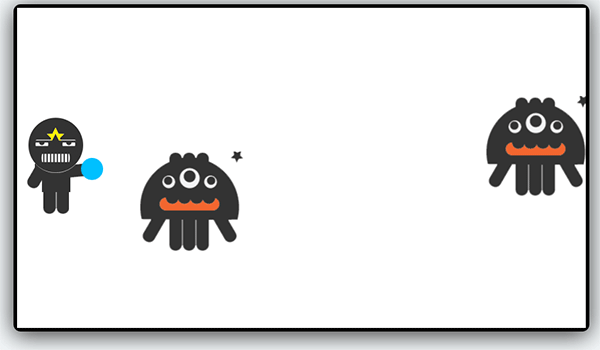
ในบทเรียนต่อไปจะเป็นการสอนวิธีการ เพิ่มลูกกระสุนเข้าไปใน Project เกมของเราครับ
สำหรับตัวอย่างการพัฒนาใน 2 บทเรียนนี้คือ
- เขียนเกมบน HTML5 ด้วย Cocos2d X HTML และ JavaScript สร้างตัวละคร
- เขียนเกมบน HTML5 ด้วย Cocos2d X HTML และ JavaScript เพิ่มศัตรู และเวลา
สามารถดาวน์โหลด Source Code ได้ที่
https://github.com/banyapon/cocos2dHTML5-sample