บทความนี้จะเป็นการแนะนำขั้นตอนในการออกแบบ และพัฒนาแอพพลิเคชันแบบ Mobile Web App ด้วย Framework ของ Sencha Touch 2 แบบทีละขั้นตอน
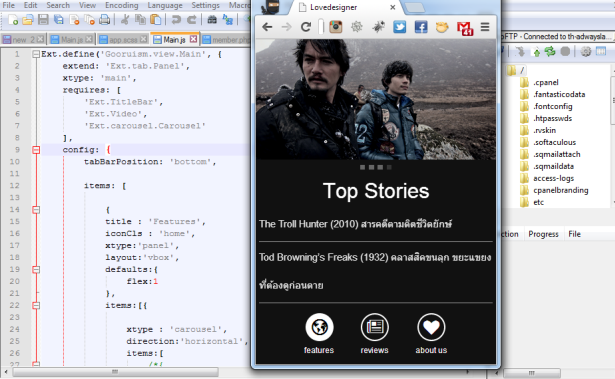
แน่นอนว่าก่อนอื่นต้องสร้างตัว Project ของคุณขึ้นมาก่อนให้ไปที่ Path Folder ของ Sencha Touch ของคุณด้วย CMD แล้วใช้คำง Sencha CMD สร้าง New App หรือ New Project ขึ้นมาใหม่
[วิธีการสามารถอ่านได้ที่บทความนี้ พัฒนา Mobile Web App ด้วย Sencha Touch 2.2.0 รู้จักกับ Sencha Cmd]
C:/>Appserv/www/SenchaTouch/sencha generate app MobileWeb C:/Appserv/www/MobileWeb
หลังจากนั้นก็มาเริ่มต้นกันครับ ในธีมที่ผมอยากจะพัฒนาแอพพลิเคชันนั้นผมอยากจะพัฒนาให้ Look & Feels ออกมาแบบ Windows Mobile หรือ Windows 8 มีธีมเป็นสีดำ
ให้ไปที่ Folder ของ Project เราครับ แล้วไปที่ Folder ที่ชื่อว่า resources/sass/app.scss
แก้ไข Sass ตามนี้ครับ
$base-color: #000;
@import 'sencha-touch/base';
@import 'sencha-touch/base/all';
@import 'sencha-touch/windows';
@import 'sencha-touch/windows/all';
ให้เราไปที่ CMD แล้วก็ Compile ไฟล์ sass ด้วยคำสั่งนี้ครับ [ศึกษาได้ที่ เปลี่ยน Theme Sencha Touch ด้วย SASS และ Compass บน Windows และ OS X]
C:/>Appserv/www/MobileWeb/compass compile resources/sass
เมื่อเสร็จแล้วจะได้แอพพลิเคชันที่มีรูปแบบเป็น Windows Phone ครับ
ต่อมาให้แก้ไข Header ตามนี้
Ext.define('Gooruism.view.Main', {
    extend: 'Ext.tab.Panel',
    xtype: 'main',
    requires: [
        'Ext.TitleBar',
        'Ext.Video',
		'Ext.carousel.Carousel'
    ],
เพิ่ม เมนูของ Tab ด้านล่างดังนี้ครับ
config: {
tabBarPosition: 'bottom',
items: [
{
title : 'Features',
iconCls : 'home',
xtype:'panel',
layout:'vbox',
defaults:{
flex:1
},
items:[{
xtype : 'carousel',
direction:'horizontal',
items:[
/*{
docked: 'top',
xtype: 'titlebar',
title: 'Lovedesigner'
},*/
{
xtype : 'panel',
html: [
" ",
"เรื่องราวของเหล่า Gangster แนวใหม่กับการล้มอำนาจเจ้าพ่อ",
].join("")
},
{
xtype : 'panel',
html: [
'
",
"เรื่องราวของเหล่า Gangster แนวใหม่กับการล้มอำนาจเจ้าพ่อ",
].join("")
},
{
xtype : 'panel',
html: [
' '
].join("")
},
{
xtype : 'panel',
html: [
'
'
].join("")
},
{
xtype : 'panel',
html: [
' '
].join("")
},
{
xtype : 'panel',
html: [
'
'
].join("")
},
{
xtype : 'panel',
html: [
' '
].join("")
}
]
},{
xtype: 'nestedlist',
title: 'Top Stories',
iconCls: 'settings',
cls: 'home',
displayField: 'title',
store: {
type: 'tree',
fields: ['title',
'link',
'author',
'contentSnippet',
'content', {
name: 'leaf',
defaultValue: true
}],
root: {
leaf: false
},
proxy: {
type: 'jsonp',
url: 'http://ajax.googleapis.com/ajax/services/feed/load?v=1.0&num=5&q=http://www.lovedesigner.net/feed/',
reader: {
type: 'json',
rootProperty: 'responseData.feed.entries'
}
}
},
detailCard: {
xtype: 'panel',
scrollable: true,
styleHtmlContent: true
},
listeners: {
itemtap: function(nestedList, list, index, element, post) {
this.getDetailCard().setHtml(post.get('content'));
}
},
getItemTextTpl: function(node) {
return '{title}';
}
}
]
},
{
xtype: 'nestedlist',
title: 'Reviews',
iconCls: 'settings',
cls: 'blog',
displayField: 'title',
store: {
type: 'tree',
fields: ['title', 'link', 'author', 'contentSnippet', 'content', {
name: 'leaf',
defaultValue: true
}],
root: {
leaf: false
},
proxy: {
type: 'jsonp',
url: 'http://ajax.googleapis.com/ajax/services/feed/load?v=1.0&num=20&q=http://www.lovedesigner.net/feed/',
reader: {
type: 'json',
rootProperty: 'responseData.feed.entries'
}
}
},
detailCard: {
xtype: 'panel',
scrollable: true,
styleHtmlContent: true
},
listeners: {
itemtap: function(nestedList, list, index, element, post) {
this.getDetailCard().setHtml(post.get('content'));
}
},
getItemTextTpl: function(node) {
return '{title}';
}
},
{
title: 'About Us',
iconCls: 'team',
xtype : 'panel',
html: [
'
'
].join("")
}
]
},{
xtype: 'nestedlist',
title: 'Top Stories',
iconCls: 'settings',
cls: 'home',
displayField: 'title',
store: {
type: 'tree',
fields: ['title',
'link',
'author',
'contentSnippet',
'content', {
name: 'leaf',
defaultValue: true
}],
root: {
leaf: false
},
proxy: {
type: 'jsonp',
url: 'http://ajax.googleapis.com/ajax/services/feed/load?v=1.0&num=5&q=http://www.lovedesigner.net/feed/',
reader: {
type: 'json',
rootProperty: 'responseData.feed.entries'
}
}
},
detailCard: {
xtype: 'panel',
scrollable: true,
styleHtmlContent: true
},
listeners: {
itemtap: function(nestedList, list, index, element, post) {
this.getDetailCard().setHtml(post.get('content'));
}
},
getItemTextTpl: function(node) {
return '{title}';
}
}
]
},
{
xtype: 'nestedlist',
title: 'Reviews',
iconCls: 'settings',
cls: 'blog',
displayField: 'title',
store: {
type: 'tree',
fields: ['title', 'link', 'author', 'contentSnippet', 'content', {
name: 'leaf',
defaultValue: true
}],
root: {
leaf: false
},
proxy: {
type: 'jsonp',
url: 'http://ajax.googleapis.com/ajax/services/feed/load?v=1.0&num=20&q=http://www.lovedesigner.net/feed/',
reader: {
type: 'json',
rootProperty: 'responseData.feed.entries'
}
}
},
detailCard: {
xtype: 'panel',
scrollable: true,
styleHtmlContent: true
},
listeners: {
itemtap: function(nestedList, list, index, element, post) {
this.getDetailCard().setHtml(post.get('content'));
}
},
getItemTextTpl: function(node) {
return '{title}';
}
},
{
title: 'About Us',
iconCls: 'team',
xtype : 'panel',
html: [
'About Us
',
' ',
'
',
'Mobile Content จากเว็บไซต์ http://www.lovedesigner.net รวมบทความกรท่องเที่ยวรีวิว และไลฟ์สไตล์ ติดต่อส่งบทความรีวิวได้ที่ Email:[email protected]
'
].join("")
}
]
}
Item แรกเป็นการใข้ Carousel หรือ Image Sliding เลื่อนภาพ โดยผมไปนำภาพมาจากเว็บไซต์ของผมอีกที
{
xtype : 'panel',
html: [
''
].join("")
},
{
xtype : 'panel',
html: [
''
].join("")
},
{
xtype : 'panel',
html: [
''
].join("")
 }
แนบด้วยการดึง Feed ของเว็บไซต์ http://www.lovedesigner.net/feed มาผ่าน JSONP ของ Google APIs ครับ
[5]
Item ที่สองหรือเมนูที่สองเป็นการดึง เหมือนข้อมูลเมื่อกี้แต่แสดงผลทั้งหน้า
หน้าสุดท้ายก็ใช้ HTML ธรรมดา แนบไฟล์รูปภาพปรกติครับ
title: 'About Us',
iconCls: 'team',
xtype : 'panel',
html: [
'About Us
',
'',
'Mobile Content จากเว็บไซต์ http://www.lovedesigner.net
รวมบทความกรท่องเที่ยวรีวิว และไลฟ์สไตล์
ติดต่อส่งบทความรีวิวได้ที่ Email:[email protected]
'
].join("")
ต่อจากนั้นก็มาปรับแต่ง sass และ Compile จนกว่าจะพอใจครับ
ซึ่งผลลัพธ์สุดท้ายที่ทำได้คือรูปแบบของ Mobile Web App แบบนี้ครับ
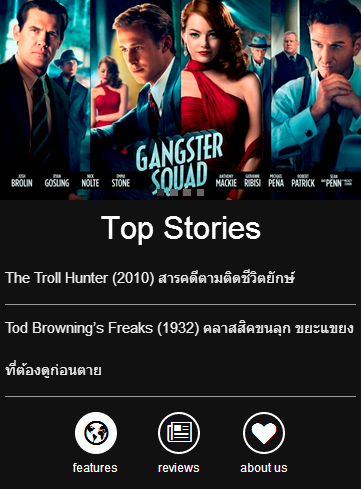
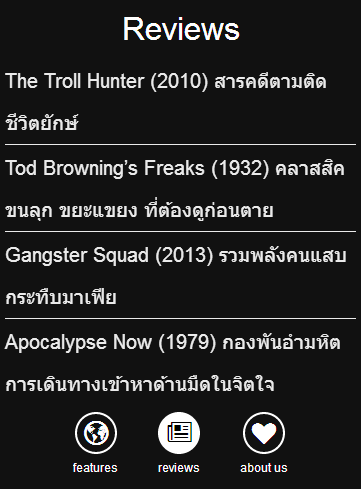


ตอนนี้กำลังลองนำไปเขียนกับ UIWebView ของ XCode เพื่อขึ้น App Store ดูอีกที ไม่ยากใช่ไหมครับการเขียน Sencha Touch 2
หากใครสนใจนำ Source Code จากบทความนี้ก็สามารถเข้าไปดาวน์โหลดศึกษาได้ครับที่
https://github.com/banyapon/Sencha_Lovedesigner