

จากตอนที่แล้วสำหรับการสร้างเกม 2D บน iPhone หรือ iOS ด้วย Sprite Kit นะครับจะเป็นการเพิ่ม ตัวละครลงไปในหน้าจอเกม รอบนี้เรามาต่อกันดีกว่าครับ
รอบที่แล้ว หากจำได้ในบทความ สร้างเกมบน iPhone ด้วย Sprite Kit สำหรับ 2D Game ตอนที่ 1 (กลับไปศึกษาก่อนก็ดีนะครับ) เราจะทราบว่าการทำงานของ SpriteKit นั้นไม่ยากเลย รอบนี้เราก็จะมาเพิ่มอะไรบางอย่างเพื่อให้เกม Shooting ของเราสมบูรณ์ขึ้นครับ

ถ้าในตอนที่แล้วมีตัวละครของเราเป็น Player แล้ว ต่อไปก็น่าจะไม่พ้นการสร้างศัตรูขึ้นมาครับ
เปิดไฟล์ MyScene.m ครับทำการประกาศเมธอดฟังก์ชัน addmonster() ขึ้นมาดังนี้ครับ
- (void)addMonster {
}
จะเป็นการบอกเลยว่าผมต้องการเพิ่มศัตรูเข้าไปในเกมครับ หาภาพกราฟิกมาหน่อยแล้วกัน
ผมเลือก มังกรสีแดงมาเป็นศัตรูครับ

ต่อมาในเมธอด addMonster ผมจะต้องเพิ่ม ภาพกราฟิกลงตัวแปรหน่อย
SKSpriteNode * monster = [SKSpriteNode spriteNodeWithImageNamed:@“enemy.png”];
ตำแหน่งของ ศัตรูนั้น ผมจะส่งให้มันสุ่มปรากฏจากตำแหน่งต่างๆ ในแกน Y ของหน้าจอแอพพลิเคชันของเราครับ ดังนั้นเราต้องจัดการเรื่องพิกัดของ Y axis มากกว่า X axis แน่ๆ
int minY = monster.size.height / 2;
int maxY = self.frame.size.height - monster.size.height / 2;
int rangeY = maxY - minY;
int actualY = (arc4random() % rangeY) + minY;
เมื่อได้ การสุ่มในแกน Y จากตัวแปร actualY แล้วก็เรียกใช้งาน Sprite ของ monster ได้เลย
monster.position = CGPointMake(self.frame.size.width + monster.size.width/2, actualY);
[self addChild:monster];
ไม่ต้องห่วงเรื่องการปรากฏตัวแล้ว ทีนี้ เราต้องให้มันเคลื่อนที่มาโจมตีเราใช่ไหมครับ เราต้องใช้ Duration ของเวลามาช่วยเล็กน้อย
int minDuration = 2.0;
int maxDuration = 4.0;
int rangeDuration = maxDuration - minDuration;
int actualDuration = (arc4random() % rangeDuration) + minDuration;
ชุดคำสั่งข้างบนเมื่อกี้เป็นการเรียกกำหนด Duration ของความเร็ว และใช้การสุ่มเช่นเคยต่อการเคลื่อนไหว ต่อไปเป็นการสร้าง Action ให้กับเจ้า Monster ของเราครับ ให้มันเลื่อนไปจากตำแหน่ง X ขวาไปซ้ายสุด
SKAction * actionMove = [SKAction moveTo:CGPointMake(-monster.size.width/2, actualY) duration:actualDuration];
SKAction * actionMoveDone = [SKAction removeFromParent];
[monster runAction:[SKAction sequence:@[actionMove, actionMoveDone]]];
การเรียกทำงานให้ Monster ของเราปรากฏตัวบินไปมาใช้ actionMove ในการควบคุม และเมื่อมันปรากฏตัวหลุดไปจากจอแล้วให้ทำการลบออกจากหน่วยความจำครับ ด้วย actionMoveDone กับคำสั่ง removeFromParent
ตามด้วยการกำหนดตัวแปล ที่จะควบคุมการนับเวลา หรือ Duration ให้ไปประกาศคำสั่งนี้ที่ MyScene.h ครับ
@property (nonatomic) NSTimeInterval lastSpawnTimeInterval;
@property (nonatomic) NSTimeInterval lastUpdateTimeInterval;
อย่าลืมไป add synthesize ที่ MyScene.m ด้วยครับ
@implementation MyScene
@synthesize player;
@synthesize lastSpawnTimeInterval;
@synthesize lastUpdateTimeInterval;

ต่อจากนั้นสร้าง เมธอด updateWithTimeSinceLastUpdate() ขึ้นมาครับ เขียนคำสั่งต่อไปนี้ลงไป

- (void)updateWithTimeSinceLastUpdate:(CFTimeInterval)timeSinceLast {

self.lastSpawnTimeInterval += timeSinceLast;
if (self.lastSpawnTimeInterval > 1) {
self.lastSpawnTimeInterval = 0;
[self addMonster];
}
}
เป็นการเพิ่มศัตรูทีละ 1 ตัวที่มีการจับเวลาเพิ่มขึ้น
แก้ไขเมธอด update() ที่ระบบสร้างมาให้แต่แรกด้วยคำสังนี้ครับ จากเดิมคือ
-(void)update:(CFTimeInterval)currentTime {
/* Called before each frame is rendered */
}
แก้ไขเป็น
-(void)update:(CFTimeInterval)currentTime {
/* Called before each frame is rendered */
CFTimeInterval timeSinceLast = currentTime - self.lastUpdateTimeInterval;
self.lastUpdateTimeInterval = currentTime;
if (timeSinceLast > 1) { // more than a second since last update
timeSinceLast = 1.0 / 60.0;
self.lastUpdateTimeInterval = currentTime;
}

[self updateWithTimeSinceLastUpdate:timeSinceLast];
}
เป็นการอัพเด็ท Last Action ของการนับเวลาของตัวเกม
ดังนั้น Code ทั้งหมดของหน้า MyScene.m ของเราจะปรากฏด้วย คำสั่งต่อไปนี้ กรุณาตรวจสอบให้ดีว่าผิดพลาดตรงไหนบ้าง
#import "MyScene.h"

@implementation MyScene
@synthesize player;
@synthesize lastSpawnTimeInterval;
@synthesize lastUpdateTimeInterval;

-(id)initWithSize:(CGSize)size {
if (self = [super initWithSize:size]) {

self.backgroundColor = [SKColor colorWithRed:1.0 green:1.0 blue:1.0 alpha:1.0];
self.player = [SKSpriteNode spriteNodeWithImageNamed:@"player2"];
self.player.position = CGPointMake(100,CGRectGetMidY(self.frame));
[self addChild:self.player];
}
return self;
}

- (void)addMonster {
SKSpriteNode * monster = [SKSpriteNode spriteNodeWithImageNamed:@"enemy.png"];
int minY = monster.size.height / 2;
int maxY = self.frame.size.height - monster.size.height / 2;
int rangeY = maxY - minY;
int actualY = (arc4random() % rangeY) + minY;
monster.position = CGPointMake(self.frame.size.width + monster.size.width/2, actualY);
[self addChild:monster];

int minDuration = 2.0;
int maxDuration = 4.0;
int rangeDuration = maxDuration - minDuration;
int actualDuration = (arc4random() % rangeDuration) + minDuration;
SKAction * actionMove = [SKAction moveTo:CGPointMake(-monster.size.width/2, actualY) duration:actualDuration];
SKAction * actionMoveDone = [SKAction removeFromParent];
[monster runAction:[SKAction sequence:@[actionMove, actionMoveDone]]];
}

- (void)updateWithTimeSinceLastUpdate:(CFTimeInterval)timeSinceLast {

self.lastSpawnTimeInterval += timeSinceLast;
if (self.lastSpawnTimeInterval > 1) {
self.lastSpawnTimeInterval = 0;
[self addMonster];
}
}

-(void)update:(CFTimeInterval)currentTime {
         /* Called before each frame is rendered */
      CFTimeInterval timeSinceLast = currentTime - self.lastUpdateTimeInterval;
     self.lastUpdateTimeInterval = currentTime;
     if (timeSinceLast > 1) { // more than a second since last update
         timeSinceLast = 1.0 / 60.0;
         self.lastUpdateTimeInterval = currentTime;
        }

[self updateWithTimeSinceLastUpdate:timeSinceLast];
}

@end
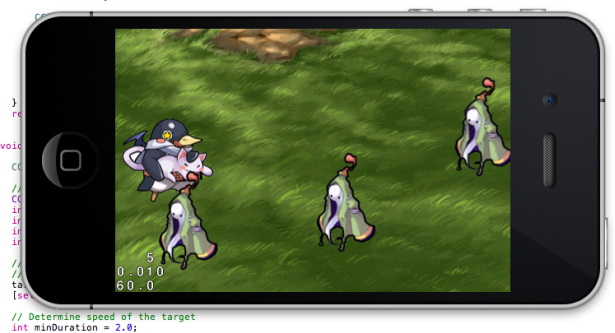
ทำการ Run ตัวเกมเราสักหน่อยครับ
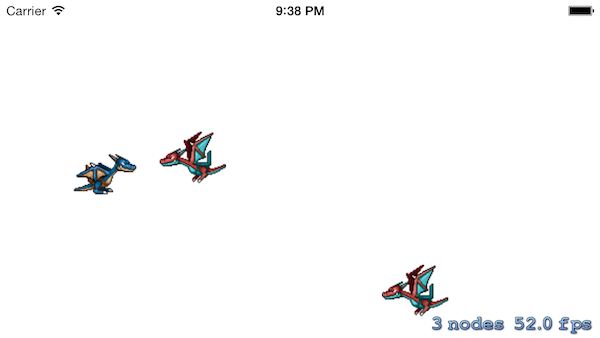
จะเห็นว่าตัวศัตรูหรือ Monster ของเรานั้น บินเข้ามาหาเรามากมายเลย ถือว่าเราสำเร็จบทเรียนนี้อีกขั้นครับ บทเรียนต่อไปคือการสร้างกระสุนให้มังกรของเรายิงลูกไฟใส่ ศัตรูได้ก็รบ หลักการพัฒนาเกม 2D แนว Shooting เรียบร้อยแล้วครับ
บทเรียนที่ควรศึกษาก่อน สร้างเกมบน iPhone ด้วย Sprite Kit สำหรับ 2D Game ตอนที่ 1
Source code ในบทเรียนนี้ ดาวน์โหลดได้ที่ http://adf.ly/gDFgJ



One Comment