BeginningDeveloperFeaturedGoogle DevelopersHTML5JavaScriptNewbieProgramming Language

เพิ่มภาพ Complex Marker บน Google Maps JavaScript API v3

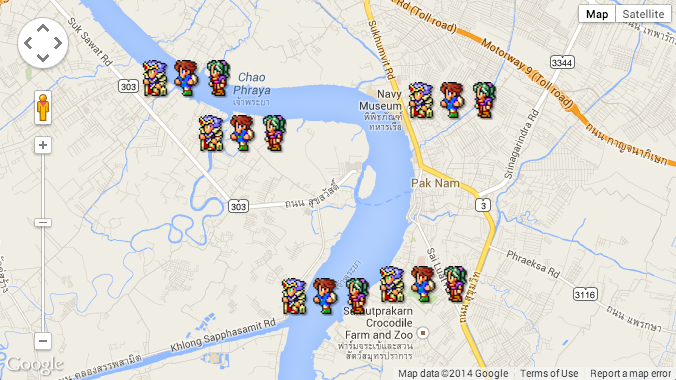
ตัวอย่างการใช้งาน Google Maps JavaScript API v3 ในการวางรูปภาพ Complex Marker ด้วยภาพกราฟิกนามสกุล png ลงไปใน Google Maps ให้น่าสนใจกว่า Marker ตัวเดิมวิธีการไม่ยากครับ แค่หาภาพมาวางซ้อน นามสกุล .png ก็พอ

สร้างไฟล์ index.html ขึ้นมา แล้วใส่ Code ดังนี้ครับ


    Heroes of Google Maps


ทดสอบนะครับ จะเห็นว่า ตัวอย่างที่ทำให้จะทำงานแบบนี้ครับ

Screen Shot 2557-02-12 at 4.51.46 PM

โคตรง่าย เพราะผมไม่ได้เขียนอะไรใหม่เลย นอกจากขนาด Width และ Height ของภาพกราฟิกผมแค่นั้นครับ

var image = {
    url: 'images/heroes.png',
//90 คือขนาด Width ภาพ, 39 คือขนาด Height ภาพ
    size: new google.maps.Size(90, 39),
    origin: new google.maps.Point(0,0),
    anchor: new google.maps.Point(0, 39)
  };

ทดสอบได้ที่ https://www.daydev.com/demo/mapquest/

Asst. Prof. Banyapon Poolsawas

อาจารย์ประจำสาขาวิชาการออกแบบเชิงโต้ตอบ และการพัฒนาเกม วิทยาลัยครีเอทีฟดีไซน์ & เอ็นเตอร์เทนเมนต์เทคโนโลยี มหาวิทยาลัยธุรกิจบัณฑิตย์ ผู้ก่อตั้ง บริษัท Daydev Co., Ltd, (เดย์เดฟ จำกัด)

Related Articles

Back to top button
Game & Mobile Development AR VR XR
Privacy Overview

This website uses cookies so that we can provide you with the best user experience possible. Cookie information is stored in your browser and performs functions such as recognising you when you return to our website and helping our team to understand which sections of the website you find most interesting and useful.

Adblock Detected

เราตรวจพบว่าคุณใช้ Adblock บนบราวเซอร์ของคุณ,กรุณาปิดระบบ Adblock ก่อนเข้าอ่าน Content ของเรานะครับ, ถือว่าช่วยเหลือกัน