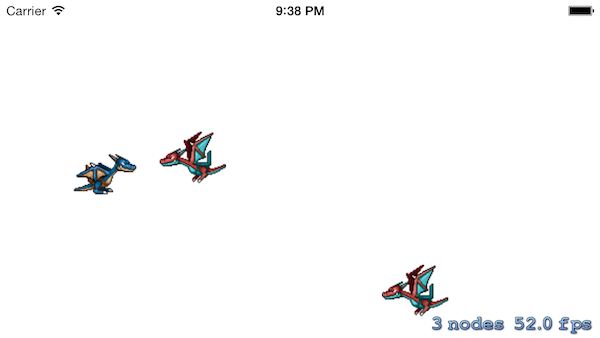
วิธีการพัฒนาเกมบน iPhone ด้วย Sprite Kit ตอนที่ 3 กับการสร้างกระสุนในเกม Shooting ให้ยิงใส่ศัตรูเพื่อศึกษา การทำงานของ Collision Detect ในเกมครับ
จากบทความก่อนหน้านี้ เราจะเรียนรู้วิธีสร้างเกม 2D แนว Shooting มาบ้างแล้ว หากสงสัยกลับไปอ่านก่อนนะครับที่บทความนี้
- สร้างเกมบน iPhone ด้วย Sprite Kit สำหรับ 2D Game ตอนที่ 1
- สร้างเกมบน iPhone ด้วย Sprite Kit สำหรับ 2D Game ตอนที่ 2
ถ้าไม่มีข้อสงสัยแล้วก็มา เพิ่มการยิงกระสุน กับศึกษา Collision Detect กันครับ
แก้ไขส่วนบนสุดของ MyScene.m ของเราให้เป็นดังนี้ครับ (สังเกตุดีดี)
@interface MyScene()<SKPhysicsContactDelegate>
@end

@implementation MyScene
เมื่อแก้ไขแล้วให้ เพิ่ม Code ประกาศ Static Variable ใต้
@implementation MyScene
ตามนี้ครับ
static inline CGPoint rwAdd(CGPoint a, CGPoint b) {

    return CGPointMake(a.x + b.x, a.y + b.y);

}

static inline CGPoint rwSub(CGPoint a, CGPoint b) {

    return CGPointMake(a.x - b.x, a.y - b.y);

}

static inline CGPoint rwMult(CGPoint a, float b) {

    return CGPointMake(a.x * b, a.y * b);

}

static inline float rwLength(CGPoint a) {

    return sqrtf(a.x * a.x + a.y * a.y);

}

// Makes a vector have a length of 1

static inline CGPoint rwNormalize(CGPoint a) {

float length = rwLength(a);

return CGPointMake(a.x / length, a.y / length);

}
เมื่อได้กำหนดค่าของ Physics ที่กระสุนจะไปแล้ว ก็ได้เวลาสร้างเมธอดของการยิง เมื่อแตะทัชหน้าจอครับ
-(void)touchesEnded:(NSSet *)touches withEvent:(UIEvent *)event {

    UITouch * touch = [touches anyObject];
    CGPoint location = [touch locationInNode:self];

    SKSpriteNode * projectile = [SKSpriteNode spriteNodeWithImageNamed:@"projectile"];
    projectile.position = self.player.position;

    CGPoint offset = rwSub(location, projectile.position);

    if (offset.x <= 0) return;

    [self addChild:projectile];

    CGPoint direction = rwNormalize(offset);

    CGPoint shootAmount = rwMult(direction, 1000);

    CGPoint realDest = rwAdd(shootAmount, projectile.position);

    float velocity = 480.0/1.0;
    float realMoveDuration = self.size.width / velocity;
    SKAction * actionMove = [SKAction moveTo:realDest duration:realMoveDuration];
    SKAction * actionMoveDone = [SKAction removeFromParent];
    [projectile runAction:[SKAction sequence:@[actionMove, actionMoveDone]]];

}
กำหนดตำแหน่งเมื่อเกิดการแตะที่หน้าจอให้เป็นจุดหมายของกระสุนที่
CGPoint direction = rwNormalize(offset);
ต่อมาก็มาปรับเรื่องของ Coliision Detect ครับ เมื่อกระสุนเรา ยิงไปโดนศัตรู จะเกิดเหตุการณ์ขึ้นครับ
แก้ไขข้อมูล MyScene.m ส่วนบทสุดดังนี้ครับ
#import "MyScene.h"

static const uint32_t projectileCategory     =  0x1 << 0;
static const uint32_t monsterCategory        =  0x1 << 1;
ใส่คำสั่งเล็กน้อยเกี่ยวกับ Physics และ Vector ในการยิงไปโดนที่ initWithSize()
-(id)initWithSize:(CGSize)size {
    if (self = [super initWithSize:size]) {

        self.backgroundColor = [SKColor colorWithRed:1.0 green:1.0 blue:1.0 alpha:1.0];
        self.player = [SKSpriteNode spriteNodeWithImageNamed:@"player2"];
        self.player.position = CGPointMake(100,CGRectGetMidY(self.frame));

        self.physicsWorld.gravity = CGVectorMake(0,0);
        self.physicsWorld.contactDelegate = self;

        [self addChild:self.player];
    }
    return self;
}
เพิ่มการกระทำ เมื่อโดนศัตรูของเรา โดยคำสั่งต่อไปนี้ ในเมธอด addMonster()
    monster.physicsBody = [SKPhysicsBody bodyWithRectangleOfSize:monster.size];
    monster.physicsBody.dynamic = YES;
    monster.physicsBody.categoryBitMask = monsterCategory;
    monster.physicsBody.contactTestBitMask = projectileCategory;
    monster.physicsBody.collisionBitMask = 0;
ทำการจำขนาดของ monster เป็น Rectangle จดจำค่า projectile หรือกระสุน ไว้ และจำค่า monster หรือศัตรูไว้ให้รู้ว่า Object 2 ตัวนี้เกี่ยวข้องกัน
ต่อไปคือ การเพิ่มคำสั่ง CollisionDetection ในเมธอด touchesEnded:withEvent()
หาภาพกระสุนมาชื่อว่า fire.png
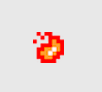
SKSpriteNode * projectile = [SKSpriteNode spriteNodeWithImageNamed:@"fire"];

projectile.position = self.player.position;
projectile.physicsBody = [SKPhysicsBody bodyWithCircleOfRadius:projectile.size.width/2];
projectile.physicsBody.dynamic = YES;
projectile.physicsBody.categoryBitMask = projectileCategory;
projectile.physicsBody.contactTestBitMask = monsterCategory;
projectile.physicsBody.collisionBitMask = 0;
projectile.physicsBody.usesPreciseCollisionDetection = YES;
เมื่อเกิดการกระทับกันให้ NSLog ขึ้นมาว่า “Hit” ครับ แล้วทำการเคลียร์ตัวแปรของศัตรูที่บินไปมาออกไปจากหน้าจอทันที
- (void)projectile:(SKSpriteNode *)projectile didCollideWithMonster:(SKSpriteNode *)monster {

    NSLog(@"Hit");
    [projectile removeFromParent];
    [monster removeFromParent];
    self.monstersDestroyed++;
    if (self.monstersDestroyed > 10) {

        UIAlertView *alert = [[UIAlertView alloc] initWithTitle:@"Game Finish!" message:@"Play Again?" delegate:self cancelButtonTitle:@"Cancel" otherButtonTitles:nil];
        // optional - add more buttons:
        [alert addButtonWithTitle:@"OK"];
        [alert show];
    }

}
เพิ่มเงื่อนไขมาว่าถ้าเราโจมตีศัตรูได้มากกว่า 10 ตัวให้มีการเรียก UIAlertView ขึ้นมาบอกว่าเราผ่านด่านแล้วครับ
เปิดไฟล์ MyScene.h ขึ้นมา เพิ่มคำสั่งต่อไปนี้ลงไปเพื่อเตรียมพร้อมสำหรับการเล่นใหม่ในแต่ละครั้งเมื่อจบเกม
#import <SpriteKit/SpriteKit.h>

@interface MyScene : SKScene

@property (nonatomic) SKSpriteNode * player;

@property (nonatomic) NSTimeInterval lastSpawnTimeInterval;
@property (nonatomic) NSTimeInterval lastUpdateTimeInterval;
@property (nonatomic) int monstersDestroyed;

@end
ทำการ Synthesize ตัวแปรที่เพิ่มเข้าไปที่ MyScene.m ครับ
@synthesize player;

@synthesize lastSpawnTimeInterval;
@synthesize lastUpdateTimeInterval;
@synthesize monstersDestroyed;
เพิ่มเมธอดสำหรับเริ่มเกมใหม่ลงไปครับ didBeginContact()
- (void)didBeginContact:(SKPhysicsContact *)contact
{
     SKPhysicsBody *firstBody, *secondBody;

    if (contact.bodyA.categoryBitMask < contact.bodyB.categoryBitMask)
    {
        firstBody = contact.bodyA;
        secondBody = contact.bodyB;
    }
    else
    {
        firstBody = contact.bodyB;
        secondBody = contact.bodyA;
    }

    if ((firstBody.categoryBitMask & projectileCategory) != 0 &&
        (secondBody.categoryBitMask & monsterCategory) != 0)
    {

       [self projectile:(SKSpriteNode *) firstBody.node didCollideWithMonster:(SKSpriteNode *) secondBody.node];
    }

}
ทดสอบเกมของเราอีกครั้งโดยการ Run แล้วลอง ยิงกระสุนใส่ศัตรูสัก 10 ตัวดูครับ จะพบว่าเกม Shooting แบบง่ายของเรานั้นเสร็จสมบูรณ์แล้ว เอาไปอวดเพื่อนได้เลย!

Source Code ของ Project นี้ดาวน์โหลดได้ที่: http://adf.ly/gS6vt
บทความที่เกี่ยวข้อง
- สร้างเกมบน iPhone ด้วย Sprite Kit สำหรับ 2D Game ตอนที่ 1
- สร้างเกมบน iPhone ด้วย Sprite Kit สำหรับ 2D Game ตอนที่ 2